Benefits

Improved efficiency
Understand the performance of equipment and personnel with real-time data collection. Eliminate production bottlenecks and optimize resource utilization.

Accurate data collection
Eliminate manual, time consuming and often inaccurate data collection by automating and streamlining the entire data collection process.

Faster response times
Monitor and visualize the performance of equipment and personnel to respond faster, catch errors sooner, and communicate better.

Eliminate guesswork
Understand the inner workings of your production with customized reports including machine downtime, OEE and other essential KPIs.

Reduce administration time
Reduce paper reliance and administrative time. Update your ERP, MES or other administrative system with real-time data from equipment and personnel.

Access your data anywhere
Access data from one or more sites directly from your mobile device. Easily check the status of equipment or any other information critical to your operation.
Features
Real-time monitoring / Andon
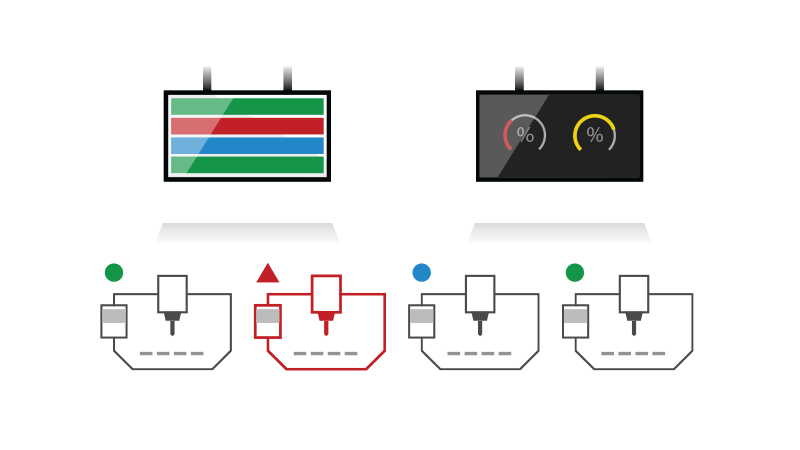
See the current status and performance data of your machines on Andon boards, PC and mobile. Customize the layout and content of screens to suit your needs.
Customizable reports
Generate reports with calculation of OEE, downtime and other essential KPIs. Set production targets, work shifts and sort data by different factors.
Real-time reporting
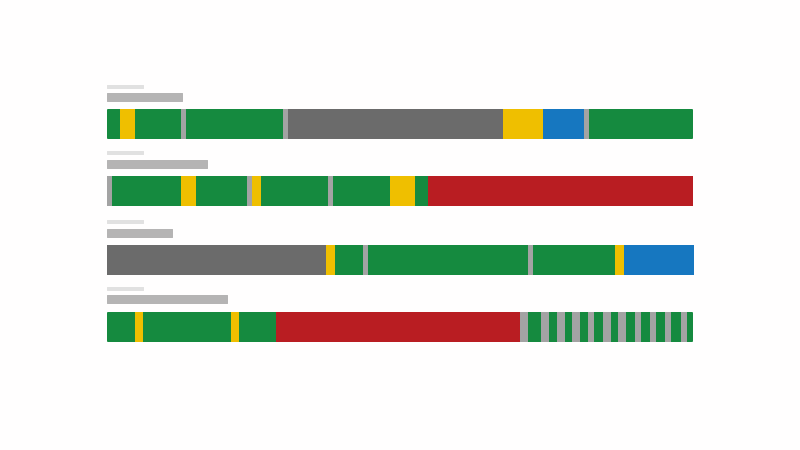
Generate real-time reports that dynamically update as data comes in, such as machine timelines.
Works with your equipment
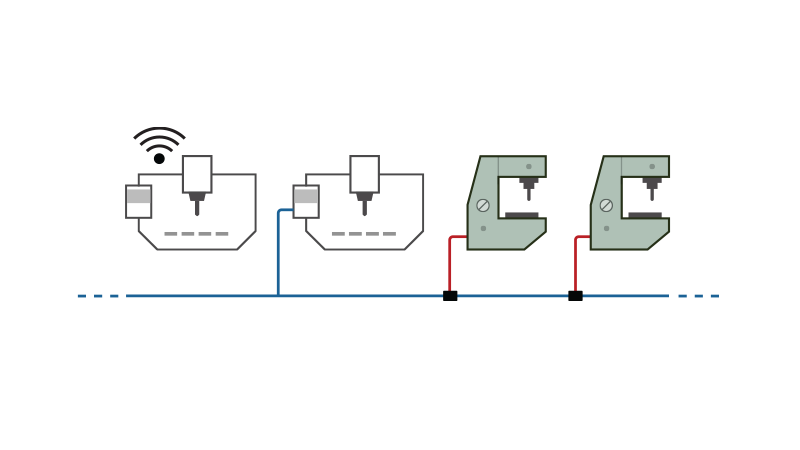
Collect data automatically or manually using your existing wireless network, Ethernet, RS-232 or Parallel I/O. Use existing barcode readers and PCs on the shopfloor.
Integration with external systems
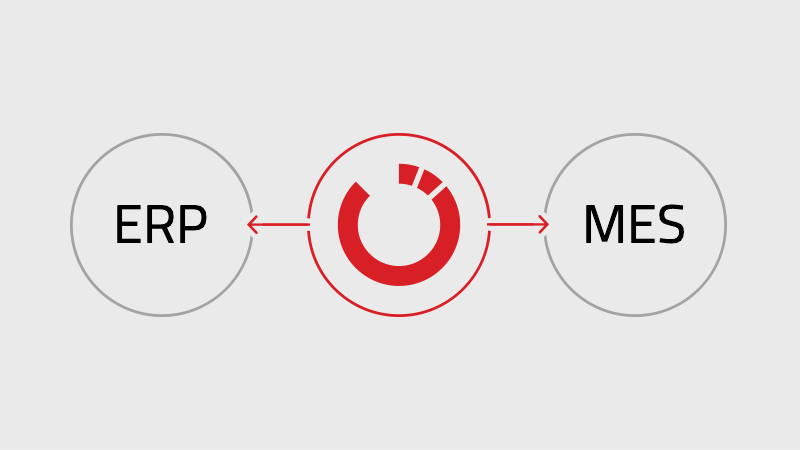
Streamline data management and workflows by updating ERP, MES or other administrative systems directly with data from MDC-Max.
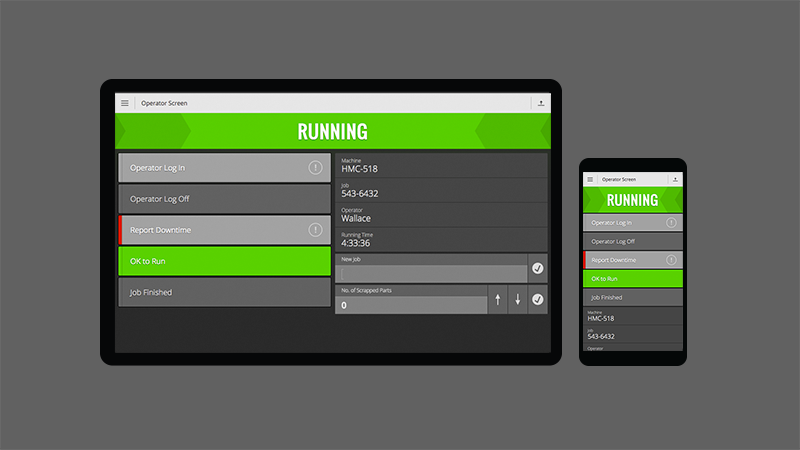
Operator interface (manual collection)
Enables operators to access essential information directly at the machine and enter data such as current shift, job, reasons for downtime and scrap.

Andon and signaling units
Control signaling units such as stack lights, buzzers and Andon boards that indicate the status of your machines.

Email and text notifications
MDC-Max can send text and email alerts to key staff on any machine and operator event such as automatically during unattended runs.

Secure user management
Fine-grained control over user access and permissions. View logs of user actions and system events for auditing and troubleshooting purposes.
Customer stories

| System Components |
|---|
|
Scalable architecture / multiple plant support
MDC-Max is a versatile solution that can suit both small shops and large enterprises with thousands of machines across multiple locations. It consists of Server, PC client and Web Client components that can run on one PC or multiple servers with unlimited PCs and Web Clients connected.
|
|
CIMCO MDC-Max Server
Server application that runs a fast SQL database (optionally Microsoft SQL) and handles various tasks in the background, such as processing incoming data, updating reports, communicating with external systems and distributing monitoring data to Dashboards, Live Screens, Operator Screens, etc.
|
|
CIMCO MDC-Max PC Client
Windows-based PC client application that allows configuring the MDC-Max system. The PC client also shows Timelines, Live Screens, Operator Screens and offers advanced reporting features.
|
|
CIMCO MDC-Max Web Client (mobile client / mobile monitoring)
Web client that works on any modern mobile device, such as tablet, smartphone or smart TV. Allows remote access to Operator Screens, Dashboards, Live Screens and Shop Floor Screens. Data is updated in real-time without browser-reloading and all clients can be updated centrally. Supports bright and dark themes.
|
|
CIMCO DNC-Max (machine communication)
Software for configuring machine ports and managing network. Also offers features such as advanced program transfers, Remote Request, dynamic feedrate and spindle speed adjustment, auto-receive, parameter offsets and more.
|
| Data collection |
|---|
|
CIMCO MDC-Max tracks both scheduled and unscheduled downtime by combining machine and operator data. While machine data can be collected accurately, error-free and unattended, operator data provides the context to fully understand reasons for downtime, scrap or other aspects that impact production negatively.
|
|
Automatic data collection
Accurate data from machines is collected automatically and unattended by MDC-Max. Most installations will, as a minimum, collect data on Cycle Start, Cycle Stop, and Part Complete. The data collection events can be customized according to the monitoring capabilities of each machine.
|
|
Manual data collection
MDC-Max offers an easy-to-use operator interface for mobile and PC to view and enter data manually. Operators can register the exact causes of machine downtime such as Setup, Maintenance, Scrap, Inspection and more. MDC-Max also supports barcode readers.
|
|
Unlimited data collection events
MDC-Max can be configured to collect data on any event limited only by machine capabilities.
|
| Real-time monitoring / Andon boards / digital signage |
|---|
|
Machine Timelines
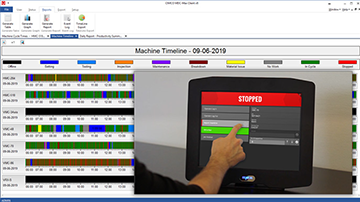
Real-time monitoring using Timeline charts enables you to easily monitor the current and past state of all your machines. Each machine state and downtime reason is visualized with different bar colors and can be expanded to reveal additional information.
|
|
Real-time reporting
Set up real-time reports in the MDC-Max PC client that are dynamically updated, on screen, as incomming data is processed. You can have multiple reports open and updating in different tabs at the same time. The MDC-Max reporting system is flexible and can support any custom reports that suit your operation's needs.
|
|
Dashboards
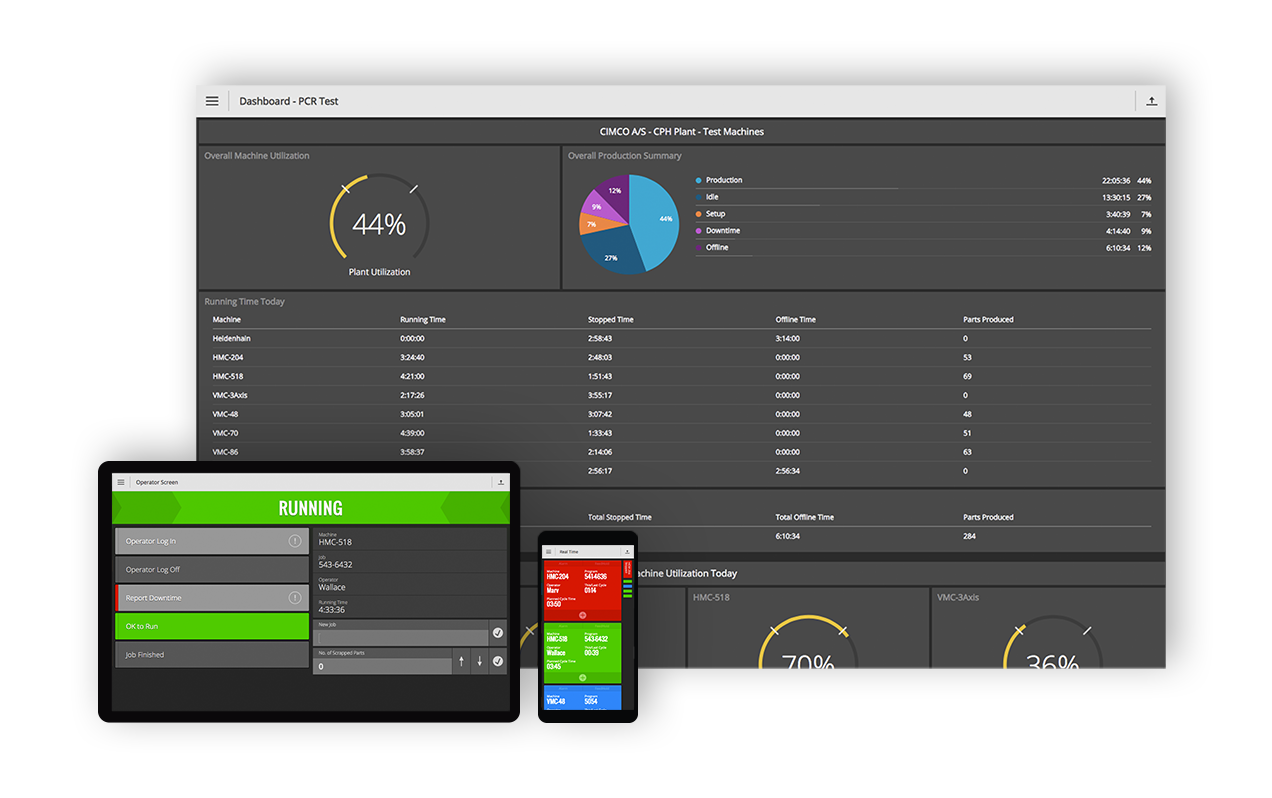
Dashboards provide an overview of your real-time production data and KPIs (such as OEE) at a glance. Create multiple custom Dashboards to focus on different production facilities, different machine groups or other requirements you may have. Dashboards can be displayed on large TV monitors as digital signage or on any mobile device using the MDC-Max Web Client.
|
|
Live Screens
Live Screens show the state of each machine in real-time, along with OEE, current job, operator/shift, parts produced/scrapped and cycle time. Machines are color-coded by state, with flashing colors and alert lights for critical states. You can customize Live Screens and display them on large TV monitors or any mobile device with the MDC-Max Web Client.
|
|
Shop Floor Screens
Shop Floor Screens let you see the status of all your machines based on their location. Machines are color-coded by state, with notification/alert lights for critical states. Tap any machine to see KPIs (OEE), current operator/job and more. You can display Shop Floor Screens on large TV monitors or any tablet or smartphone with the MDC-Max Web Client. You can also move, scale, rotate and change the look of machines.
|
|
Slideshows
Make Slideshows of your Dashboards, Live Screens and Shop Floor Screens. Slideshows scroll through the whole content of each screen and can be paused and resumed as needed. You can show Slideshows on large TV monitors or any mobile device with the MDC-Max Web Client.
|
| Andon units and notifications |
|---|
|
Control of signaling units
MDC-Max enables you to control various signaling units that provide visual and audible feedback of machine state. These include Tower Stack lights, Beacons, sound alarms and more. You can customize how machine and operator events activate different colors or sounds on the signaling units. You can also assign a single signaling unit, such as a stack light, to a group of machines
|
|
Email and text notifications on any event
MDC-Max can alert key staff via text and email for any event from machines or operators. If a machine falls behind or stops while running unattended, such as in Lights-out Manufacturing, MDC-Max can promptly notify the right person to take action.
|
| Downtime tracking, operator feedback |
|---|
|
Dedicated Operator interface (PC and mobile)
MDC-Max offers a user-friendly operator interface (Operator Screen) that lets operators view vital information and enter data such as downtime reasons, current job/operator/shift, scrap reasons and more. You can customize the operator interface to suit your needs and use it on any touch-enabled mobile device or PC on the shop floor. You can also mount a tablet at every machine or manage multiple machine-specific operator interfaces from a single mobile device with ease.
|
|
Barcode reader support
MDC-Max works with barcode readers and gives you instructions for setting up and printing new barcodes. You can use barcodes to send data to MDC-Max such as current job, operator, shift, scrapped parts or downtime reasons. Barcode readers are mostly relevant if you already have them. Otherwise, we suggest using Operator Screens which have more features and flexibility.
|
|
Unlimited number of Downtime Reasons
MDC-Max supports and unlimited number of downtime reasons to meet the requirements of any operation. Downtime reasons can be sent using the Operator Screen or using a Barcode Reader.
|
|
Supports Job and Program numbers
MDC-Max has dedicated options for managing Job and Program numbers and can automatically link the event data it collects, from machines and operators, to the job running on each machine. This allows MDC-Max to provide precise statistics about every job on every machine.
|
| Reporting |
|---|
|
Real-time and historic reports
MDC-Max can create both real-time and historic reports. Real-time reports are updated on screen as new data comes in, while historic reports use existing data to summarize longer time periods such as a week, month or year. With its modern tabbed interface, the MDC-Max PC Client lets you have multiple reports open and updating at the same time.
|
|
Predefined report templates
MDC-Max comes with many predefined reports that meet most common reporting needs and that can be used as templates for further customization.
|
|
Unlimited custom reports (report examples)
With the flexible reporting system in MDC-Max, you can create custom reports to suit any operation. Display data in tables, pie or bar charts, include production targets, work shifts and calculate any KPI, using user-defined formulas, such as OEE, MTBF, MTTR, and more.
Examples of reports:
|
|
Event log reporting (user, machine, job, activity)
Generate detailed activity reports such as Error logs, Operator logs and Machine logs.
|
|
Export and auto-update reports in Excel
CIMCO MDC-Max comes with full support for Microsoft Excel spreadsheets. You can easily export reports for further analysis in Excel and MDC-Max can even update your Excel spreadsheet automatically, so you always have the latest data.
|
|
Stand-alone Excel reports (with direct data access)
With our advanced Excel reports, data from MDC-Max can be pulled directly into Excel. This enables anyone in your organisation, with the right permissions, to generate reports directly in Excel.
|
|
Send reports via email
Reports can be automatically exported to Excel, XML, or other formats and emailed.
|
| Security and user management |
|---|
|
Secure user management
The secure and robust user/group management system in MDC-Max enables fine-grained control over user access and permissions. The MDC-Max clients, database configuration and Operator Screen cannot be accessed without appropriate permissions.
|
|
Complete logging
MDC-Max keeps detailed logs of all incoming and outgoing events including Error logs, Operator logs and Machine logs. You can store logs permanently or restart them on a daily, weekly or monthly basis. You can also export logs to an external database (that other systems can access) or directly to an Excel spreadsheet.
|
| Network and machine connections |
|---|
|
Supports Wireless, Ethernet, RS-232 and Parallel I/O
MDC-Max can connect with your existing network and works with various hardware options such as serial wiring, Ethernet and wireless networking. MDC-Max gathers data from equipment on your network either directly (if a data collection interface is available) or indirectly using additional hardware to establish the connection. The data collection method depends on the specific type of equipment and its monitoring capabilities.
|
|
Extensive support for data collection protocols
MDC-Max comes with specialized messaging protocols for communicating directly with a wide variety of network based machines/interfaces including Fanuc FOCAS, Haas M-Net, MTConnect, Heidenhain, Netlink, Brother, OPC, Modbus, MQTT, and more.
|
|
Support for Telemetry data
MDC-Max includes powerful functions for date collection and management based on analog signals. Calculations such as spindle speed, power consumption, etc. can be used in Andon boards, reports, exports, and much more.
|
|
Support for extracting DPRNT messages
MDC-Max can be configured to extract messages from incoming DPRNT commands, sent from a machine's serial communications port.
|
| Integration with external systems |
|---|
|
Integration with external data sources
MDC-Max can automatically read/write/update data in multiple data sources such as external databases, Web Services and XML file export. You can associate data exchange with specific events and user-defined conditions. This enables integration with external systems such as your ERP and MES systems.
|
|
Direct ODBC connection to database
If required, external systems can access (read/write/update) date in the MDC-Max database directly using the ODBC protocol.
|
|
Integration with external systems through OEM Link
For custom integration with external systems and automation of processes, CIMCO provides a C++ library called OEM Link (.dll) which can be customized by the customer. The OEM Link is controlled by the MDC-Max Server and can be programmed to “catch” events from operators and machines as they are received by MDC-Max. This enables the customer to run custom code whenever specific events occur such as calling a Web Service, exporting data to a specific file format or communicate with external APIs.
|