

Benefits

No network configuration required
Remote access to the CIMCO web clients, on your company’s private network, can be achieved without touching network settings or opening ports on your router.

Secure connection with TLS
Secure connection between CIMCO Cloud Link and your local server using the end-to-end encrypted TLS protocol (Transport Layer Security).

Easy remote access
Access CIMCO Cloud Link and your local web clients by simply browsing to the URL (your_subdomain).cimco.info.

Simultaneous access
Simultaneous access to CIMCO web clients. Have any number of web clients access your data simultaneously.

Cloud Link Configuration
Online configuration page with real-time status of the secure connection between the Cloud Link Service and the Agent.
How it works
CIMCO Cloud Link consists of a cloud service and a small program referred to as an Agent. The CIMCO Cloud Agent is installed on the local server/PC, in your company, that hosts the web clients you wish to access remotely. Once installed, a secure end-to-end encrypted connection is established between the Cloud Link Service and the Agent.
To access the web client running on the local server/PC, remote users simply browse to a specific web address (the public endpoint) from where they can then securely log into the web client of their choice.
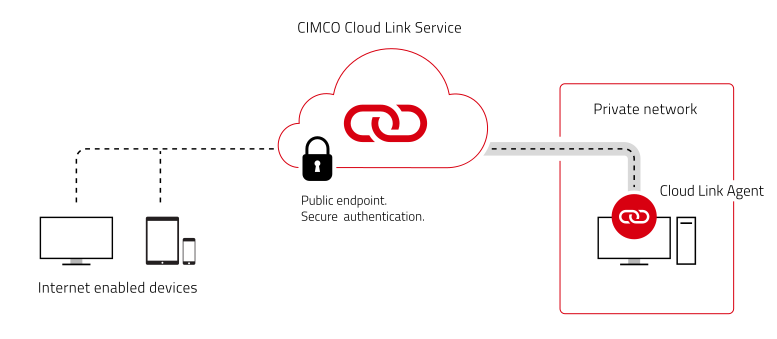
By going to the specified web address using a PC, tablet or smartphone, users will instantly see the familiar CIMCO login screen. All communication is tunneled securely through the CIMCO Cloud Link Service with end-to-end encryption using the TLS protocol.


